Workflow Architecture#
A high-level overview of how Dioptra components work together to execute jobs.
Summary: What comprises a Dioptra Workflow?#
To run a job within a Dioptra experiment, multiple Dioptra components need to be created and combined. This explainer provides a high level view of how all these pieces fit together.
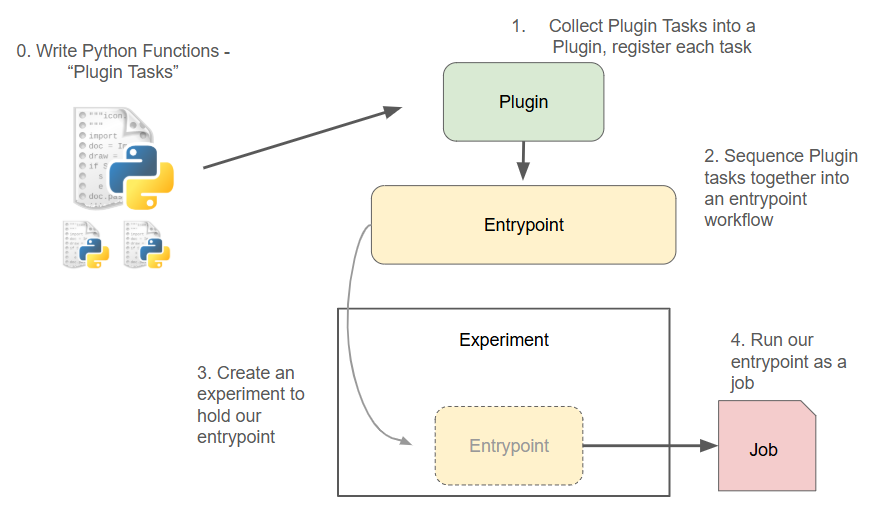
Dioptra Workflow Overview The four essential steps needed to run Python functions in Dioptra.#
As the above diagram illustrates, modular functions and execution graphs are the bedrock of running jobs in Dioptra.
More specifically:
Tasks are parameterizable functions that are stored within Plugin containers
Entrypoints are reusable, parameterizable execution graphs that chain together multiple Tasks, defined via a Task Graph
A Job is a parameterized execution of an Entrypoint within an Experiment.
Jobs can produce Artifacts, which are objects saved to disk.
Example Experiment: Adversarial ML#
In the context of a Dioptra experiment seeking to evaluate ML attacks and defenses, some potential examples include:
- Function Tasks:
Task 1: Prepare a dataset for training
Task 2: Fit a model
Task 3: Evaluate a model
Task 4: Generate adversarial inference examples
etc…
- Artifact Tasks:
Task 1: Save/read a trained model to/from disk
Task 2: Save/read adversarial data to/from disk
etc…
- Entrypoints:
EP 1: Perform a model training workflow
Dataset preparation → Model fitting → Model saving
EP 2: Adversarial dataset creation
Dataset loading → Adversarial attack optimization → Dataset generation → Dataset saving
etc…
- Experiments:
EXP 1: Adversarial testing for vision models
EXP 2: Adversarial testing for audio models
etc..
As the examples above illustrate, the key to Dioptra is defining appropriately sized resources that can be reused across a variety of contexts. When jobs are run in the Dioptra environment, Dioptra handles all the data persistence, queue management, dependencies, type checking and more. Dioptra’s ability to parametrize function tasks, entrypoints and jobs in an organized matter unlocks the ability to execute experiment permutations in a principled way.
Learn More
See these concepts in action by viewing tutorials / reference implementations:
Hello World in Dioptra - Running a simple function in Dioptra
Learning the Essentials - Building up advanced functionality in Dioptra
Adversarial ML with OPTIC - A realistic reference implementation for adversarial ML on image data
What is required to run code in Dioptra?#
Dioptra is primarily a platform for executing custom code in an organized and reproducible manner. Currently, Dioptra supports the execution of Python code only.
Workflow for job execution#
To run code in Dioptra, you’ll need to perform the following steps:
Define functions in Python
Register those functions in a plugin
Define an entrypoint workflow that uses those function tasks
Create an experiment and attach your entrypoint
Run a job within that experiment, determining parameters, artifact inputs, and artifact outputs.
Required infrastructure#
Additionally, you’ll have to set up the following infrastructure before you can run a job:
A worker, which executes jobs, needs to be running and connected to a queue
Note: Dioptra automatically establishes two workers out of the box:
tensorflow-cpuandpytorch-cpu. These workers are built as standalone Docker containers. GPU workers can also be built for users with GPU access, and custom workers can be created as well
A user profile and user group need to be defined for permissions access to Dioptra resources
See Also#
With this high level view of Dioptra workflows in mind, continue reading about the individual components of Dioptra for a deeper understanding.
The Dioptra how-to guides instruct users on how to build each of these components in the Graphical User Interface (GUI) and with the Python Client.
The Dioptra component glossary provides a useful reference for all the components mentioned here.