Login.gov mDL Verifier Integration Architecture New
The NCCoE has partnered with the Login.gov Delivery team to demonstrate how mobile driver’s licenses (mDL) can be presented as a piece of identity evidence during identity verification when a user applies for a Login.gov account. mDLs provide cryptographically backed identity attributes signed by the authoritative issuer, making them superior identity evidence in the framework of NIST SP 800-63A-4. When implemented, mDL verification can provide reduced user friction and improved proofing rates by eliminating the need to photograph certain identity documents and reducing the amount of information a user needs to type in while also aligning with the NIST Digital Identity Guidelines.
Note
This effort was done under Collaborative Research and Development Agreement (CRADA) with industry stakeholders to enable exploration and experimentation with the technology, standards and user experience associated with VDC implementations. This demonstration may differ from future Login.gov mDL deployments.
The content below provides both a demonstration video and detailed architecture for the mDL verification capability implemented as part of NCCoE mDL use case #2.
SMS Initiated Cross-Device Flow
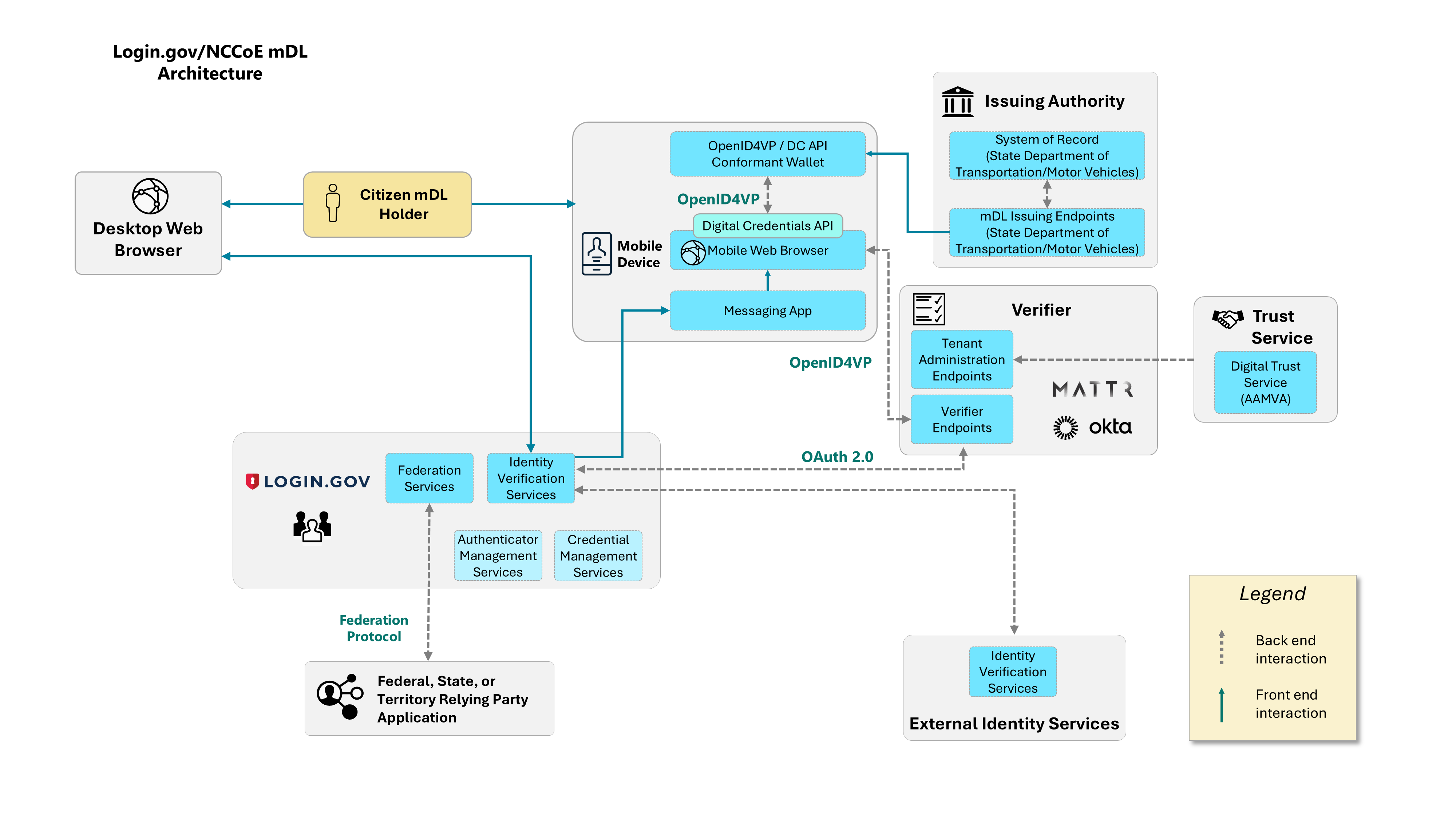
To evaluate mDL verification capabilities, the Login.gov test environment integrated with two mDL verifier platforms. To maximize user experience, the Login.gov team implemented a cross-device flow that leverages SMS, rather than using a QR code. The demonstration video below provides an example of the user experience for someone going through this flow.
The flow follows a four-step process:
Desktop initiation: The identity proofing process begins on a desktop browser at the Login.gov site.
SMS hand-off: As part of the identity proofing flow, the mDL holder’s mobile device receives a unique URL through Short Message Service (SMS), which links their mobile browser to the active desktop session.
mDL presentation: The webpage invokes the Digital Credential API and OpenID for Verifiable Presentations, executing a same device presentation of the user’s mDL.
Desktop completion: After successful mDL presentation and verification, the user is prompted to finish the flow on their desktop computer browser in the previously established session.
The use of SMS in this flow allows the architecture to transition the user from a cross-device flow to a same-device flow. As such, the Digital Credentials API is not invoked via the QR code in the user’s desktop browser but rather in their mobile browser. This flow aligns with the current Login.gov identity verification process, wherein a user’s session on a desktop is temporarily transferred to their mobile device to facilitate capturing live photo images of their identity evidence (e.g., a physical driver’s license, state ID, or U.S. passport). The implications of this design decision will be documented in a future 1800-series publication, such as SMS delivery service dependencies.
When the presented attributes pass through the Login.gov system boundary, they are encrypted and securely stored across multiple components throughout the lifecycle, and upon completion, the attributes are persisted to a database in two encrypted fields. Stored attributes are encrypted with safeguards to ensure personally identifiable information cannot be decrypted without specific user information.
To help conceptualize the Login.gov flow described above, we have created a high-level architectural view of the integrated components that support mDL identity verification:
Attribute Collection
As noted in NIST SP 1800-42, taking a picture of a driver’s license or other identity document often leads to the collection of user information beyond what is needed for identity verification. This demonstration reduces this risk by limiting the attributes requested from the user to only those necessary for identity validation: name, address, license number, issuing authority, and license issue/expiration date. To request only those attributes necessary, this demonstration used the following Digital Credentials Query Language (DCQL) query compliant with ISO 18013-5:
"dcql": {
   credentials: [
      {
      id: "mdl",
      format: "mso_mdoc",
      meta: {
         doctype_value: "org.iso.18013.5.1.mDL"
      },
      claims: [
         { path: ["org.iso.18013.5.1", "given_name"] },
         { path: ["org.iso.18013.5.1", "family_name"] },
         { path: ["org.iso.18013.5.1", "birth_date"] },
         { path: ["org.iso.18013.5.1", "issue_date"] },
         { path: ["org.iso.18013.5.1", "expiry_date"] },
         { path: ["org.iso.18013.5.1", "issuing_authority"] },
         { path: ["org.iso.18013.5.1", "document_number"] },
         { path: ["org.iso.18013.5.1", "resident_address"] },
         { path: ["org.iso.18013.5.1", "resident_city"] },
         { path: ["org.iso.18013.5.1", "resident_state"] },
         { path: ["org.iso.18013.5.1", "resident_postal_code"] }
      ]
      }]
}
Note that the query does not support the retrieval of the citizen’s social security number (SSN), which is not contained in mDLs. Instead, the SSN is collected out of band to comply with agency requirements and is validated via third-party authoritative services. As a result, this query supports building towards full alignment with the new 800-63-4 IAL capabilities that allow identity evidence to be physical or digital.
Next Steps
In the collaborative work between the NCCoE and Login.gov, we have achieved a significant milestone in Login.gov’s published roadmap to offer an mDL verification capability. We look forward to publishing lessons learned and best practices from work done in this effort and with our Collaboration team.
Comments on this and all our mDL work can be submitted to mdl-nccoe@nist.gov.