BF Tool APP Tutorial: BF Specification for Heartbleed (CVE-2014-0160)
Irena Bojanova, Inventor/Creator, PI & Lead, NIST Bugs Framework (BF), 2014 – ~~~
Irena Bojanova, Inventor/Creator, PI & Lead, NIST Bugs Framework (BF), 2014 – ~~~The BF Tool APP is a Web application designed to model security vulnerabilities as a chain of underlying weaknesses. A security bug causes the first weakness, which leads to an error. This error becomes the cause (i.e., the fault) of the next weakness and propagates through subsequent weaknesses until a final error is reached, enabling a security failure.
This tutorial provides step-by step instructions on how to use the BF Tool App to formally specify the main BF weakness chain of the classic Heartbleed (CVE-2014-0160) vulnerability.
Prerequisites and Concept Review
Before starting, review the BF Security Concepts , BF Vulnerability State Model , and BF Vulnerability Specification Model .
Remember how causation flows in a Bugs Framework (BF) specification of a security vulnerability:
Within a weakness relation:
⟨cause, operation⟩ → consequenceBetween weaknesses transition — chaining:
error ↝ fault— where the error of a previous weakness becomes the fault/cause of the next weakness.
The BF Tool enforces that the Initial Weakness begins with a code or specification bug, intermediate states propagate via faults, and the Final Weakness ends with a final error leading to a failure.
Heartbleed (CVE-2014-0160)
Heartbleed, CVE-2014-0160 was a severe vulnerability in the OpenSSL cryptographic library [ 1 ]. A server (or client) with a vulnerable heartbeat extension would bleed data via a small heartbeat message with a large requested length (i.e., larger than the actual array size). Each exploit could reveal up to 64KB of raw memory of highly sensitive information (e.g., private keys and login credentials) via buffer over-reads. However, NVD labels it with CWE-125 : Out-of-bounds Read, which covers both under-lower-bound and over-upper-bound reads from a buffer. In addition, it reflects only the weakness with the final error at the sink, not the weakness with the bug as the root cause.
The BF state view of Heartbleed is presented in Fig. 1 as two converging vulnerability chains of underlying weaknesses. The BF taxonomy helps identify and comprehensively label three weaknesses in the main chain and one more in the secondary chain.
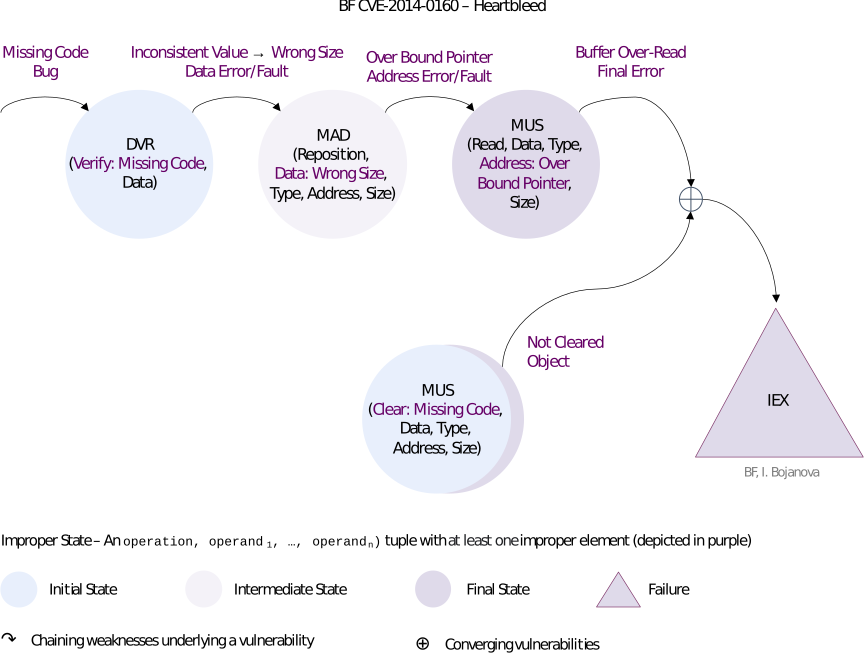
Figure 1: BF states of Heartbleed.
Step 1. Provide BFVUL Title and CVE ID
Open the BF Tool App and explore its layout. Tooltips with BF Concepts and Taxon definitions are displayed on hoovering over all TreeView nodes and other controls.
In the BFVUL Title textbox enter:
Heartbleed — Heap Buffer Over-Read in OpenSSL v1.0.1 before v1.0.1g'. Note that this textbox is marked as required — you will not be ale to Save, Download, etc. is it is empty.In the CVE ID textbox enter:
CVE-2014-0160
Step 2. Specify the Root Cause Weakness
Heartbleed Code Analysis for Weakness 1, Caused by
BF DVRBug
The bug was both in the ssl\d1_both.c and ssl\t1_lib.c files of the OpenSSL implementation of the TLS protocol [
2
].
Analysis of the C code before the fix (see Fig. 2 for d1_both.c) shows that the very first improper BF state is in the data verification phase, where the semantics of the input should be checked and corrected. The pointer p (see line 1450 in Fig. 2) is to a record of type SSL3_RECORD whose second field holds the length. The payload variable is declared as an unsigned int (see line 1452) and can be a huge number. It is assigned the value of the length field of p via the n2s macro (see line 1457). That is input data that supplies the length of an array (i.e., a buffer), but it is not checked before use toward the actual array size (i.e., the number of elements in the record data). Its value is not verified.
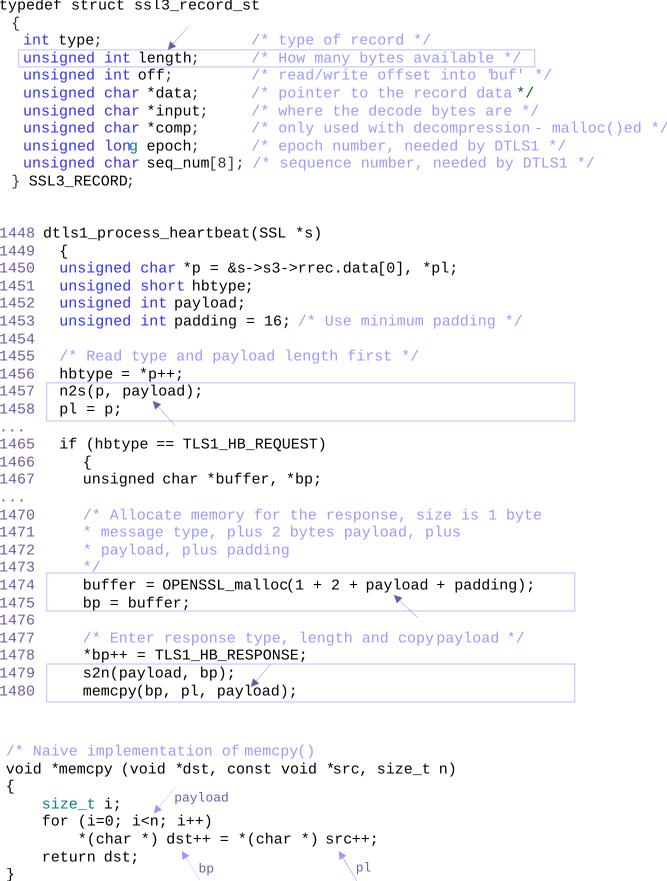
Figure 2: C code of `heartbeat()` and naive `memcpy()`.
This BF bug state is the first of a chain of improper states that would lead to buffer over-read. It is an instance of the BF Data Verification (DVR) class [ 3 ] as the (Verify: Missing Code, Data) triple with an improper Verify operation element — the entire data verification operation is absent — that results in an Inconsistent Value error.
To summarize, the Heartbleed vulnerability begins when the payload variable is assigned a length value from an incoming TLS Heartbeat request record via the n2s macro, but the software fails to verify this input length against the actual data record size. See
code also directly in GitHub
.
Heartbleed Weakness 1 Specification via the BF Tool App
To start defining a weakness, you will have to select a BF weakness class from the BF Class TreeView in the BF Weakness GroupBox container, where the classes are grouped by BF class types as parent nodes. To specify the weakness, you will have to select child nodes from the five TreeView controls and enter comments in the text boxes beneath them. Once a weakness is specified, you can proceed via the >> button and create the next weakness of the vulnerability chain. Weakness chaining is restricted by the error-to-fault by type match rule, which—to a large extent—also restricts to meaningful operation flow, as the BF classes are developed to adhere to the BF bugs models that are specific to their BF class types.
- Locate the BF Class TreeView inside the BF Weakness 1 GroupBox container. Note the
Bug/Fault,Operation,Error/Final Error,Operation Attributes, andOperand AttributesGroupBoxes inside theWeakness 1GroupBox. - Under the _INP (Input/Output Check) BF Class Type select the DVR (Data Verification Class) BF Class. Explore the Tooltips by hoovering over the BF Class Types, BF Class Short Names
- Notice that the five primary TreeView controls populate automatically as shown on Fig. 3. Explore the Tooltips by hoovering over the values under
Bug,Operation,Error/Final Error,Operation Attributes, andOperand Attributes.
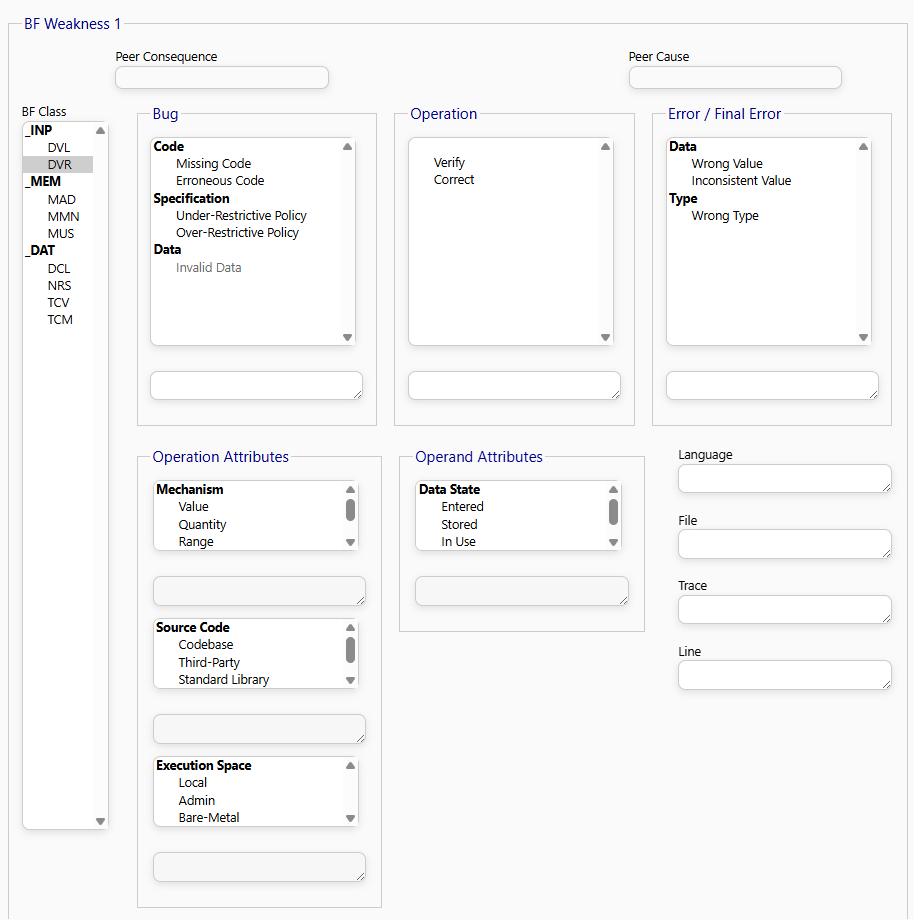
Figure 3: BF Tool App - BF _INP DVR sets of Bugs, Operations, Errors, and Operation and Operand Attributes.
The BF Tool can enforce that the initial weakness starts with a bug and the rest of the weaknesses start with a fault. The Bug/Fault label changes to Bug when the initial weakness is viewed and to Fault when the propagation or final weakness is viewed.
- In the case of a bug: Child nodes are only allowed under the
CodeandSpecificationnodes. - In the case of a fault: Child nodes are only allowed under the
Data,Type, andAddressnodes.
Because this is the Initial Weakness, once you select a BF Class, the Bug/Fault label changes to Bug.
- Under Bug as cause select:
Code>Missing Code. - Under Operation, select
Verify. - Under Error, as conseqeunce select
Inconsistent Value(the consequence of not verifying the input data). - In the text box beneath the controls, enter appropriate comments.
- Select Operation Attributes and Operand Attributes – could be done on a next pass
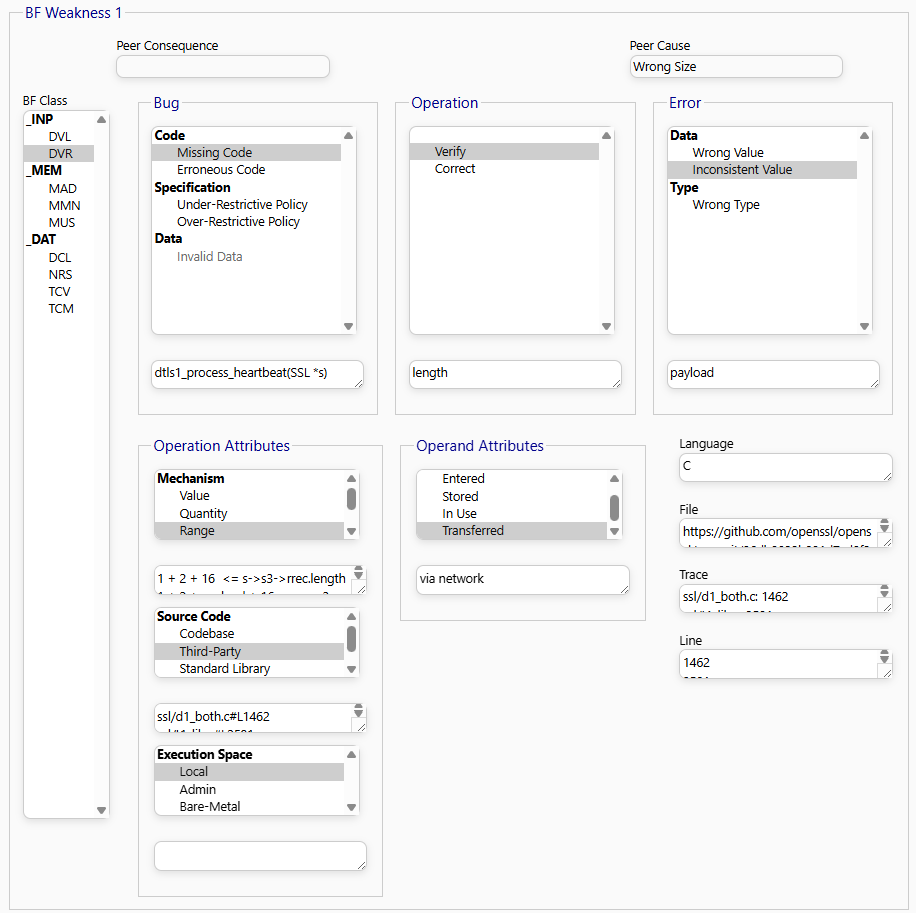
Figure 4: BF Tool App - Heartbleed Weakness 1.
“The input data supplying the length of the buffer is not checked against the actual array size before use.”
- Click the
>>button to save this weakness and move to the next chain link.
Step 3. Specify the Intermediate Weakness
Heartbleed Code Analysis for Weakness 2, Caused by a
BF MADFault
Then, memcpy() reads payload number of bytes from the object pointed by pl and copies them to the object pointed by bp (see line 1480 in Fig. 2). Following the naive C implementation of memcpy() at the bottom in Fig. 2, bp and pl are passed by reference via the dst and src arguments, and the huge payload length is passed via the n argument. First, one byte is read from pl and copied to bp. Until the huge payload length is reached, both pointers move one byte up, and the newly pointed by pl byte is read and copied. However, while bp is allocated large enough at up to 1+2+65535+16 bytes (see lines 1474 and 1475 in Fig. 2), pl points to an array with a reasonable size (see line 1458). As the content of this array is read and copied to bp, so too is a huge amount of data from over its upper bound.
To summarize, the unverified payload length is now passed directly into a loop/operation that repositions a data pointer (pl) over the source buffer during a memory copy sequence (memcpy). This constitutes a memory addressing fault. See
code also directly in GitHub
.
Heartbleed Weakness 2 Specification via the BF Tool App
- In the BF Class TreeView, select MAD (Memory Addressing Class).
*The Bug/Fault label has now automatically changed to Fault because we are inside a propagation chain.
- Under Fault (acting as the cause), select
Data>Wrong Size.
*This maps directly to the “Inconsistent Value” error of Wweakness 1 from Step 2, as also shown in the
Peer ConseqeunceTextbox.
- Under Operation, select
Reposition. - Under Error, select
Address>Overbound Pointer.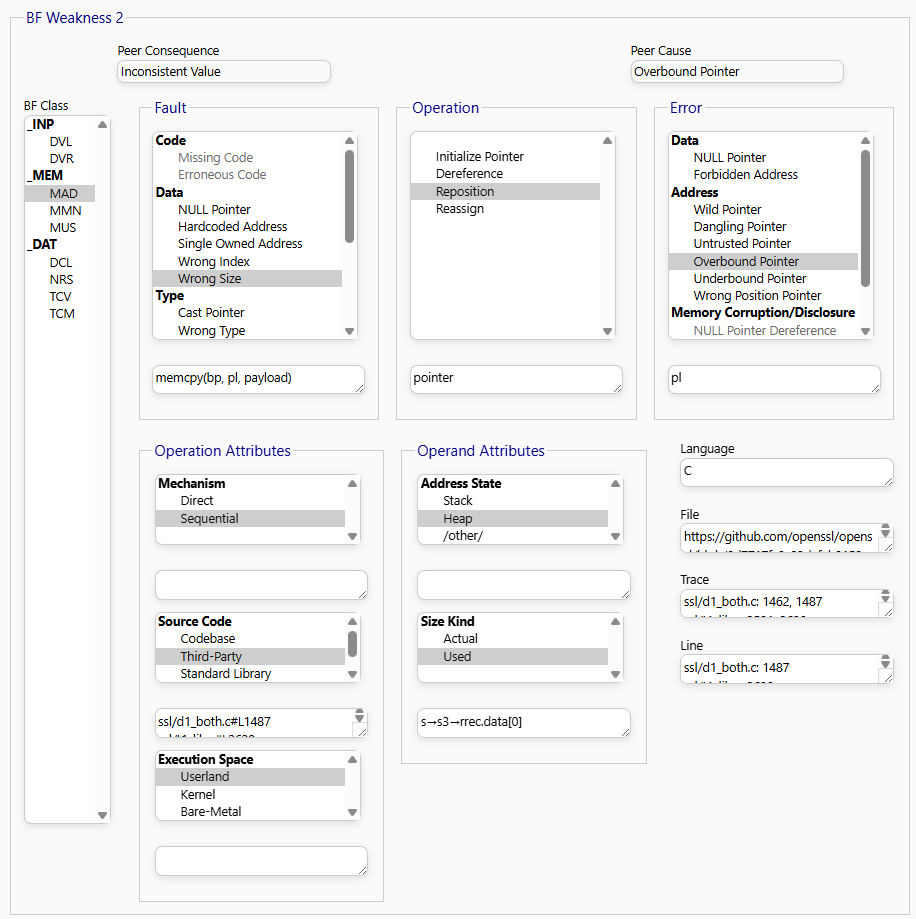
Figure 5: BF Tool App - Heartbleed Weakness 2.
*A value inconsistent with the actual size of the pl object is used to control loop iteration, shifting the pointer past its upper bound."
- Click the
>>button to proceed.
Step 4. Specify the Sink Weakness
Heartbleed Code Analysis for Weakness 3, Caused the
BF MUSFinal Error
The analysis reveals two fault states: when pl is repositioned over the array upper bound and when data values are read from there. The former is an instance of the
BF Memory Addressing (MAD)
class [
3
] as the (Reposition, Data: Wrong Size, Type, Address, Size) tuple with an improper Data operand element (see the second state in Fig. 1) that results in an Overbound Pointer error. There is no bug in the Reposition operation itself, but a value that is inconsistent with the size of the pl object is used to control the iteration. The latter is an instance of the
BF Memory Use (MUS)
class [
3
] as the (Read, Data, Type, Address: Overbound Pointer, Size) tuple with an improper Address operand element (see the third state in Fig. 1) that results in a Buffer Over-Read final error. Again, there is no bug in the Read operation itself, but because pl points overbound, it is possible to read data that should not be read (i.e., buffer over-read).
*The pointer (
pl) is overbound, the system executes a memory read command (memcpy) at that improper address, causing the confidential information exposure.
- In the BF Class TreeView, select MUS (Memory Use).
- Under Bug/Fault (Fault cause), select
Address>Overbound Pointer.
This maps directly to the “Overbound Pointer” error from Step 3.
- Under Operand, select
Data. - Under Operation Attributes, select
Read. - Under Error/Final Error, select
Buffer Over-Read(this will automatically flag as a Final Error). - Add your comment: “Because the pointer is positioned overbound, memcpy reads unauthorized data up to 64KB from raw memory.”
Heartbleed Weakness 3 Specification via the BF Tool App
- In the BF Class TreeView, select MUS (Memory Use Class).
- Under Fault, select
Address>Overbound Pointer.
This maps directly to the
Overbound Pointer' error of Wweakness 2 from Step 3, as also shown in thePeer Conseqeunce` Textbox.
- Under Operation, select
Read. - Under Final Error, select
Memory Corruption and Dsiclosure>Buffer Over-Read.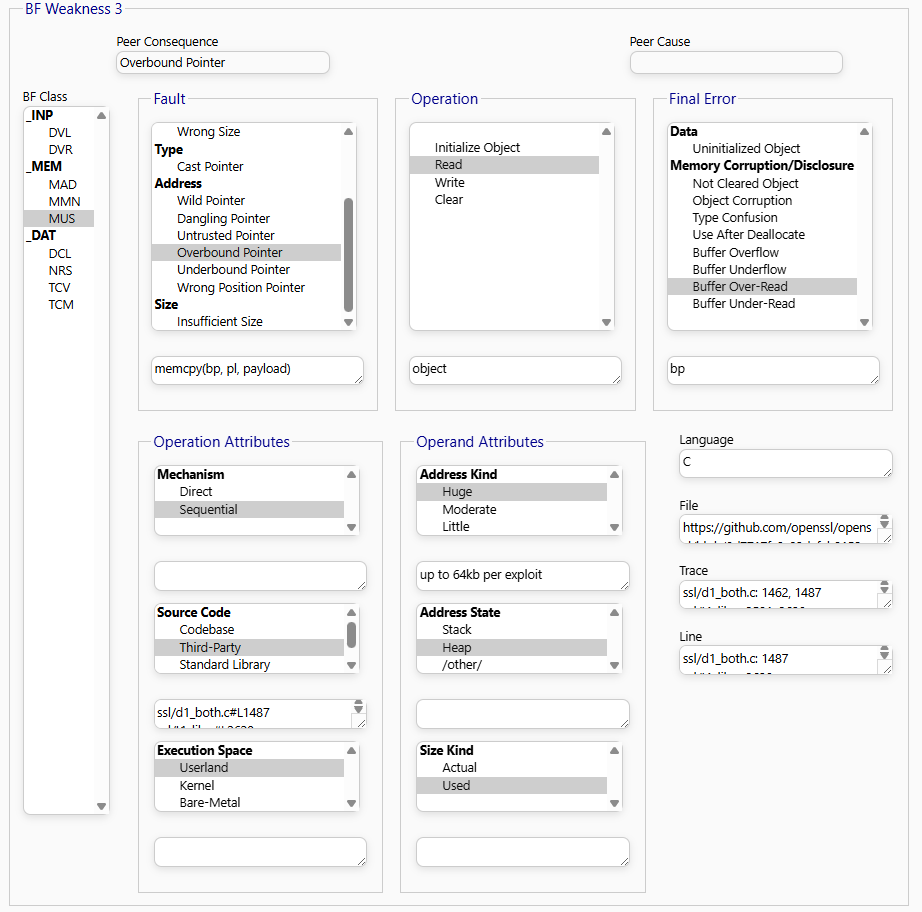
Figure 6: BF Tool App - Heartbleed Weakness 3.
The BF tool also enforces that the weakness with the Final Error consequence is the final weakness leading to a Failure.
Step 5. Specify the Failure
- In the BF Failure(s) TreeView, select IEX (Information Exposure).
- In the Text Filed benith the BF Failure(s) TreeView enter
Confidentiality Loss.
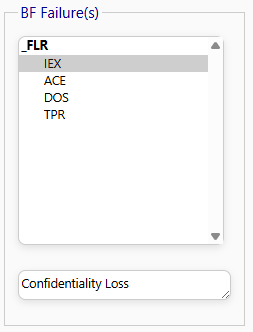
Figure 7: BF Tool App - Heartbleed Failure..
Step 6. Observe BF Semantics Rules
Uncheck the Carousel Checkbox to see the entire chain of weaknesses underlying the Heartbleed vulnerability (see Fig. 8) and ovserve how the BF Formal Language semantic rules have been applied:
- The causation within a weakness is only by a meaningful relation: $$\langle\text{cause, operation}\rangle \rightarrow \text{consequence}$$
The causation between weaknesses is by an error type to fault type match and operation flow, or by same
$$\text{error} \curvearrowright \text{fault}$$ value propagation.
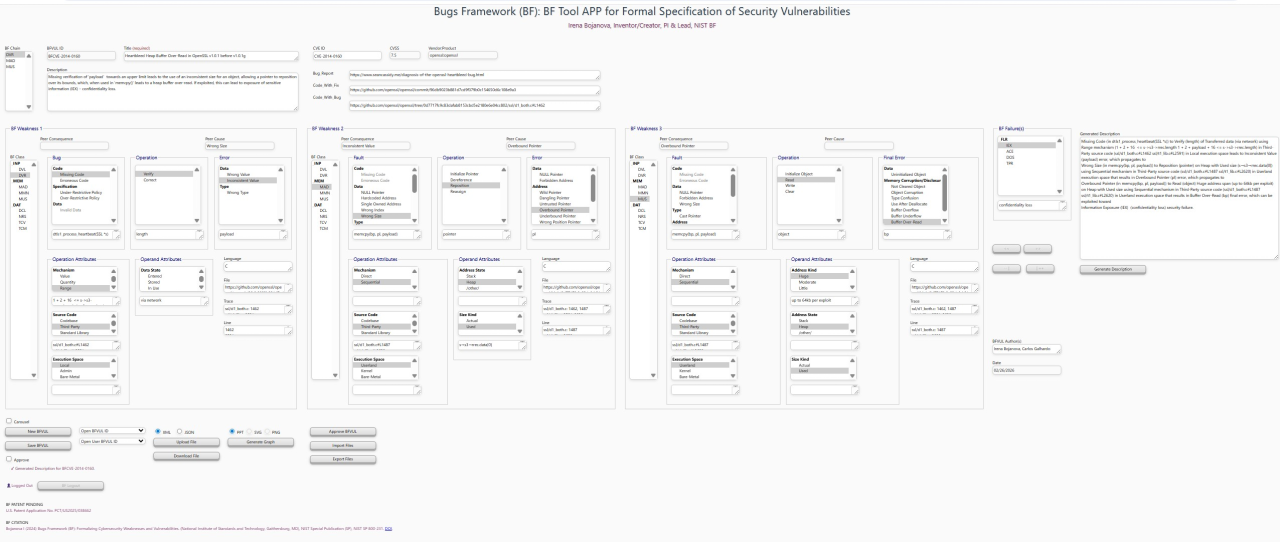
Figure 8. BF Tool App.
Check the Carousel Checkbox if you prefer the compact view.
Step 7. Add Description based on the BF specification
The Generate BF Description button displays a draft BF description based on the selected values from the five TreeView controls and Comment text boxes.
Use the
Generate Descriptionbutton and review the produced text.In the Description Textbox enter the following or another polished version of the generated description:
Missing verification of 'payload' towards an upper limit leads to the use of an inconsistent size for an object, allowing a pointer to reposition over its bounds, which, when used in 'memcpy()' leads to a heap buffer over-read. If exploited, this can lead to exposure of sensitive information (IEX) – Confidentiality Loss.
Step 7. Add Auxiliary Metadata
Fill in supplementary metadata fields if desired (e.g., repository links, commit IDs, lines 1457 and 1480 for d1_both.c).
Step 8. Generate and Export the BFCVE Specification
Review your complete multi-state vulnerability chain. Tooltips are available over any TreeView node if you need to double-check taxonomical definitions.
Select the XML or JSON Radion button and click Download File to export it in the corresponding format matching the official Bugs Framework schemas, ready for database use or automated analysis.
Select the SVG or PPT Radion button and click Generate Graph to export it in the corresponding graphical format. The PPT version is a PowerPoint XML that can be open and manipulated under Windows.
Step 9 (Extra). Specify the Second Heartbleed Chain
The three-state BF chain so far (see the upper row in Fig. 1) shows that data can be read from over the bound of the array pointed by pl. However, it does not show why an exploit would reach sensitive information, such as private keys or login credentials. The vulnerability triggered by the missing size verification bug is only a part (although the main one) of the puzzle.
There must have been another coding error due to which an unused object with sensitive data was left in memory unaware of the risks. The bug state of this parallel vulnerability is again an instance of the BF MUS class but as the (Clear: Missing Code, Data, Type, Address) tuple with an improper Clear operation (see the second chain in Fig. 1) that results in a Not Cleared Object final error. Converging the final errors from both chains (i.e., buffer over-read and not cleared object), the vulnerable software can now reach and expose sensitive information.
The bug and fault state automata of Heartbleed (see Fig. 1) expresses it as two converging vulnerability chains of underlying weaknesses. Missing input data verification leads to the use of inconsistent size for a buffer and allows for a pointer reposition over its bound, which — converging with missing clear — allows for remote reads and the exposure of sensitive information. Multiple exploits of Heartbleed, each exposing up to 64KB of memory, can accumulate huge amounts of data, such as “secret keys used for certificates, user names and passwords, instant messages, emails, and business-critical documents and communication” [ see ].
The fix of the bug in the main Heartbleed chain was to add input data semantics checks and silently ignore the heartbeat message if the requested length was larger than the actual array size (see Fig. 9) [ see ]. Lines 1468 and 1469 discard heartbeats with zero length. Lines 1472 and 1473 ensure that the actual length of the record data is sufficiently large.
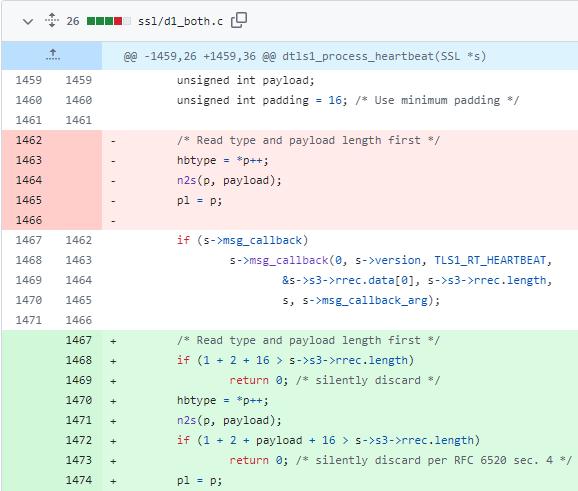
Figure 9: Heartbleed fix in Heartbeat.
The BF tool demonstrates how the BF taxonomy and causation and propagation rules tie together into the strict BF formal language. It uses the BFCVE tool functionality to generate graphical representations of the BF formal specifications to enhance understanding. See also the BF CVE-2014-0160 and related BF taxons definitions.